6 minutes
Operational Security (OpSec) for Security Professionals
Overview
Operational Security (OpSec) is the disciplined practice of identifying sensitive information, understanding how it leaks, and applying proportional controls to reduce correlation, attribution, or misuse. In modern digital environments, exposure rarely comes from a single failure; it emerges from aggregation. Small, seemingly harmless data points forming a coherent identity.
What Is OpSec?
OpSec is a continuous process, not a toolset or some product with an easy button.
It includes:
-
Identifying what information must be protected
-
Mapping how that information could leak
-
Understanding who might exploit those leaks
-
Applying controls aligned to threat level and risk tolerance
OpSec is iterative. Controls must evolve as platforms, tooling, and adversaries change.
Who Needs OpSec?
OpSec is relevant to:
-
Security professionals and analysts
-
OSINT practitioners and investigators
-
Journalists and researchers
-
Privacy-conscious individuals
-
Anyone managing multiple digital identities or public-facing accounts
The rigor required depends on who you are protecting yourself from, not a universal checklist.
Why OpSec Matters
Without OpSec:
-
Independent identifiers become correlated
-
Metadata reveals location, behavior, or intent
-
Writing style and timing fingerprint users
-
Dormant or archived accounts resurface
-
Automation scales attribution far beyond human effort
Most OpSec failures result from consistency errors, not advanced adversaries.
Can You Do OSINT Without OpSec?
Technically, yes. Practically, no; if you care about long-term safety or anonymity.
OSINT without OpSec commonly exposes:
-
IP address and network metadata
-
Timezone and activity patterns
-
Writing-style fingerprints
-
Account reuse across platforms
If attribution matters, OpSec is not optional.
Types of Information Leakage
Technical Leakage
-
IP address exposure
-
DNS leaks
-
Browser and device fingerprinting
-
User-agent inconsistencies
-
Mobile sensors (e.g., gyroscope, accelerometer)
-
Installed fonts and rendering differences
Social and Behavioral Leakage
-
Writing style and vocabulary
-
Posting cadence
-
Time-of-day activity
-
Timezone consistency
-
Reused usernames or bios
Content-Based Leakage
-
Image EXIF metadata
-
Document metadata (PDF, Word, Excel)
-
Embedded identifiers in code
-
Canary token triggers
Historical Leakage
-
Old or dormant accounts
-
Archived pages and caches
-
Breach dumps and credential reuse
-
Third-party mirrors and scrapers
OSINT & Validation Resources
IP, Network, and Location
Browser & Device Fingerprinting
Archives & Enumeration
Social Discovery
-
LinkedIn content search:
-
https://www.linkedin.com/search/results/content/?keywords=osintforfun
-
Twitter timestamps and activity analysis
Real-World Case Studies (In the News)
- Predictive analytics and personal inference:
How retail analytics inferred sensitive personal conditions
- Telecom data exposure:
AT&T breach involving SSNs and home addresses
Lookup portal: https://att.pentester.com/
- Location data misuse:
Google location history used in criminal investigations
- Platform data disclosure:
Social media data used in legal prosecution
OSINT Yourself (Self-Audit)
Before reducing exposure, identify what is already visible.
Recommended steps:
-
Complete a beginner OSINT course
-
Search for your:
-
Name
-
Email addresse/s
-
Phone number/s
-
Physical addresse/s
-
Document results and sources
-
Identify high-risk data points
Starting point:
Threat Modeling
Who Are You Hiding From?
-
Family or acquaintances
-
Stalkers or harassers
-
Data brokers
-
Advertisers
-
ISPs
-
Government entities
-
Criminal Enterprise
-
Nation-state adversaries
Threat modeling determines which controls are necessary and which are excessive.
Related reading:
Security Hardening Foundations
DNS Providers
-
NextDNS: https://nextdns.io/
-
Cloudflare DNS: https://one.one.one.one/ or https://1.1.1.1
Use DNS to block trackers, reduce telemetry, and gain query visibility.
Ad testing reference: https://www.nytimes.com
If able, host a DNS sinkhole like pihole.
Password Managers
Tools
-
Bitwarden: https://bitwarden.com/
-
Keeper: https://www.keepersecurity.com/
-
KeePassXC: https://keepassxc.org/
Practices
-
Generate unique usernames and passwords
-
Store recovery notes and backup codes
-
Avoid consolidating all MFA secrets in one place
-
Backup to offline repository frequently
Multi-Factor Authentication (MFA)
Options
-
Bitwarden Authenticator: https://bitwarden.com/products/authenticator/
-
Hardware keys (YubiKey): https://amzn.to/475IDoA
-
WebAuthn testing: https://webauthn.io/
Strongest option: Hardware-based FIDO/U2F keys.
Operating System Hardening
Tools
-
Privacy Scripts: https://privacy.sexy/
-
Cross-platform cleanup: https://www.bleachbit.org/
Disk Encryption
Enable Full Disk Encryption (FDE) to protect data at rest.
-
macOS: FileVault
-
Windows: BitLocker
-
Linux: LUKS or VeraCrypt
-
External drives: VeraCrypt
Outbound Traffic Control
-
Windows: https://www.glasswire.com/
Mobile Device Privacy
Controls
-
VPN or Cloudflare WARP
-
NextDNS
-
OS hardening
-
Secure communications: https://signal.org/
-
Secure email: https://go.getproton.me/SHzN
-
Secure calendar: Proton Calendar
-
Secure notes:
-
Signal “Note to Self”
Anonymizers & VPNs
VPNs
-
ProtonVPN: https://go.getproton.me/SHzN
-
Mullvad: https://mullvad.net/
-
Comparison: https://thatoneprivacysite.xyz/
-
Research: Zero-knowledge VPN providers
-
Self host: Cloud Provider
Tor
- Tor Browser: https://www.torproject.org/download/
Network Strategy
-
LTE/5G tethering
-
Dedicated mobile hotspots
-
Avoid predictable residential IPs when attribution matters
Browser Strategy
Browsers
-
Chrome: https://www.google.com/chrome/
-
Brave: https://brave.com/
-
Tor Browser: https://www.torproject.org/download/
Firefox Hardening Highlights
-
Enable privacy and anti-tracking settings
-
DNS over HTTPS with NextDNS
-
Limit extensions
-
Use container isolation
Browser Containers & Isolation
- Firefox Multi-Account Containers:
https://addons.mozilla.org/en-US/firefox/addon/multi-account-containers/
-
Remote browser environments:
Burners & Aliases
Email Aliases
-
DuckDuckGo Email: https://duckduckgo.com/email
-
SimpleLogin(Proton Mail Alias): https://simplelogin.io/
-
Custom domains: https://www.namecheap.com/promos/99-cent-domain-names/
Virtual Credit Cards
-
Bank-issued virtual cards (e.g., Citi, Apple Cash, CashApp):
https://www.cardbenefits.citi.com/Products/Virtual-Account-Numbers
Phone Numbers
-
Google Voice: https://voice.google.com/ - need sessioned google account, and burner number (mint mobile 3 month for about $45 USD)
-
TextNow: https://www.textnow.com/
-
Cloaked: https://try.cloaked.app/vAk1/i32e9qgblw - monthly/yearly subscription with ID monitorning.
-
Self-hosted VoIP: https://voip.operationprivacy.com/
Real SIM Options
- Mint Mobile starter kit: Two 7 Day Free trials.
https://www.bestbuy.com/site/mint-mobile-prepaid-sim-card-starter-kit-gold/6310601.p
Physical Address Strategies
-
Plausible apartment numbering
-
Non-residential locations
-
USPS-style PO Box formatting
Avoid direct linkage to real residence.
Sock Puppets & Identity Compartmentalization
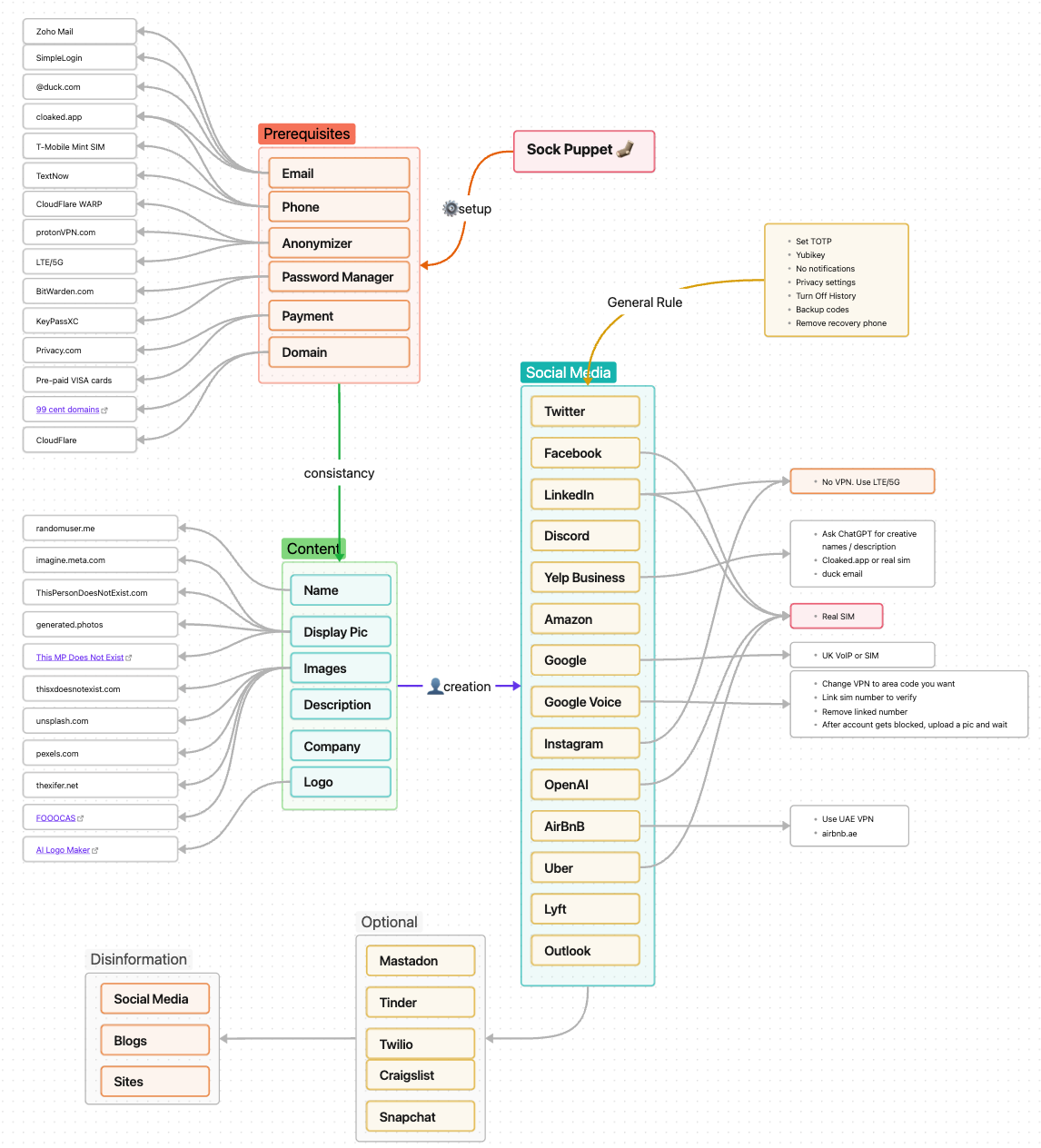
Prerequisites
-
Consistent themes
-
Randomized names
-
AI-generated images and bios
-
Separate emails, phones, and payment methods
-
No reuse across personal identities
Principle: Build the entire identity before platform interaction.
Image & Content Sources
-
Logo generation: https://ailogomaker.io/logo-designs
Randomization Principles
Avoid reuse of:
-
Usernames
-
Passwords
-
Images
-
Phone numbers
Tools like https://whatsmyname.app/ detect reuse at scale.
Metadata Handling
Removal
-
Screenshots
-
Offline tools:
Insertion (Deception)
-
Modify metadata fields
-
Add plausible but misleading attributes
-
Change document properties in Office files
-
Image metadata tools:
Cyber Deception & Information Haze
Cyber deception is the intentional introduction of plausible but non-authoritative information to reduce confidence in attribution and analysis.
Objectives
-
Increase analyst uncertainty
-
Break deterministic correlations
-
Force reliance on weak signals
-
Create multiple plausible narratives
Common Techniques
-
Conflicting biographical details across platforms
-
Metadata insertion with plausible inaccuracies
-
Decoy content (blogs, profiles, repos)
-
Controlled disinformation in public records
-
Canary identifiers to detect reuse or scraping
Cautions
-
Deception must remain plausible
-
Overuse creates pattern anomalies
-
Deception complements OpSec; it does not replace it
Virtual Machines (VMs)
Platforms
- VMware Workstation/Fusion:
Distributions
-
Pop!_OS: https://pop.system76.com/
-
Kali Linux: https://www.kali.org/get-kali/#kali-virtual-machines
Physical Privacy
-
Shred sensitive documents: Get a paper shredder!
-
Avoid identifiable backgrounds in your images.
-
Delay posting while traveling
-
Remove vehicle markings
-
Window privacy film for your home
-
Wi-Fi listing management: https://wigle.net/
-
Street View redaction tools (Google, Bing, Apple)
-
Off-site encrypted backups rotated periodically
Canary Tokens
Useful for detecting low-effort access or unauthorized reuse.
Secure File Sharing
-
Tresorit Send: https://send.tresorit.com/
-
Proton Drive: https://drive.proton.me/
Prefer encrypted, time-limited links over email attachments.
Best Practices Summary
-
Treat OpSec as an ongoing process
-
Apply controls proportionally
-
Document assumptions and decisions
-
Reassess periodically as tooling and threats evolve
Privacy Maturity Levels
Take your OpSec to the next level with this project from Mishaal Kahn https://www.OperationPrivacy.com
-
Conscious
-
Serious
-
Ghost
Conclusion
Operational Security is grounded in discipline, consistency, and awareness. Attribution rarely fails due to a single mistake; it fails through accumulation. By combining exposure reduction, compartmentalization, and measured deception, practitioners can operate effectively while minimizing unnecessary risk.
Adopt controls incrementally. Revisit this document as a living reference. With consistent application, OpSec becomes habitual rather than burdensome.
References
Cloudflare, Inc. (n.d.). 1.1.1.1 public DNS resolver. https://one.one.one.one/
Electronic Frontier Foundation. (n.d.). Cover Your Tracks. https://coveryourtracks.eff.org/
Khan, M. (n.d.). OpSec for Security Pros. JustHacking. https://learn.justhacking.com/
Mozilla Foundation. (n.d.). Firefox browser. https://www.mozilla.org/firefox/
Proton AG. (n.d.). Proton VPN. https://protonvpn.com/
Signal Foundation. (n.d.). Signal private messenger. https://signal.org/
Tor Project. (n.d.). Tor Browser. https://www.torproject.org/
Vice Media Group. (n.d.). Data privacy and surveillance reporting. https://www.vice.com/
Have I Been Pwned. (n.d.). https://haveibeenpwned.com/
Internet Archive. (n.d.). Wayback Machine. https://web.archive.org/
Privacy Guide. (n.d). https://www.privacyguides.org/